

Amazon PPC, Running Amazon PPC advertising is one of the most effective ways to increase product visibility and drive sales on Amazon. However, simply launching campaigns is not enough. Without proper optimization, advertising budgets can quickly be spent on clicks that do not lead to conversions.
One of the most important strategies in Amazon campaign management is the use of negative keywords. When used correctly, negative keywords help eliminate wasted ad spend and improve the overall performance of your campaigns.
Whether you manage campaigns yourself or work with an Amazon PPC agency or Amazon advertising agency, understanding negative keywords is essential for profitable advertising.
What Are Negative Keywords in Amazon PPC?
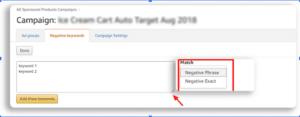
Negative keywords are search terms that prevent your ads from appearing when shoppers search for specific words or phrases.
For example, if you sell premium leather wallets, you may want to block searches such as:
- cheap wallets
- kids wallet
- wallet repair
By adding these as negative keywords, your ads will no longer appear for those searches. This helps ensure your Sponsored Products campaign targets shoppers who are more likely to purchase your product.
Using negative keywords is a core strategy in professional Amazon Ads campaign management and effective Amazon advertising management.
Why Negative Keywords Matter in Amazon Ads Management
Negative keywords play an important role in improving campaign efficiency.
When properly applied in your Amazon ads management, they help:
- Reduce wasted advertising spend
- Improve keyword targeting
- Increase conversion rates
- Lower ACoS in Amazon PPC advertising
- Focus ad spend on high-intent shoppers
Many experienced Amazon ads experts and Amazon advertising experts consider negative keyword management a critical part of long-term campaign success.
Without this step, campaigns may continue spending budget on irrelevant search terms.
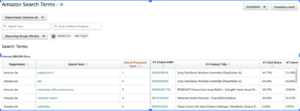
The best place to identify negative keywords is the Amazon search term report.
This report shows exactly what shoppers searched for before clicking your ad.
By reviewing this data regularly, Amazon PPC managers and Amazon PPC specialists can identify search terms that generate clicks but fail to produce sales.
These search terms are strong candidates to add as negative keywords.
This process is a fundamental part of professional Amazon ads management services and structured Amazon PPC managed service strategies.
Common Mistakes Sellers Make
Many sellers overlook negative keywords or implement them incorrectly. Common mistakes include:
- Not reviewing search term reports regularly
- Blocking keywords too aggressively
- Ignoring discovery campaigns
- Not separating testing campaigns from scaling campaigns
An experienced Amazon PPC campaign manager understands how to balance discovery and optimization while maintaining campaign efficiency.
This is why many brands work with an Amazon Ads management agency to ensure campaigns are optimized consistently.
The Role of Negative Keywords in Professional PPC Management
Successful Amazon advertising management involves more than just launching campaigns. It requires continuous optimization, including:
- Bid adjustments
- Keyword harvesting
- Negative keyword management
- Performance analysis
Professional Amazon PPC specialists and Amazon ads campaign managers use these strategies to ensure advertising budgets are spent efficiently, and campaigns continue to improve over time.
Final Thoughts
Negative keywords are a powerful tool for improving the efficiency of Amazon PPC advertising. By preventing your ads from appearing in irrelevant searches, you can protect your budget and focus on shoppers who are more likely to convert.
Whether you manage your campaigns internally or partner with an Amazon PPC agency, implementing a strong negative keyword strategy is essential for profitable Amazon ads management.
If you want expert help optimizing your campaigns and improving your advertising performance, visit ppccenter.com to learn how PPC Center’s Amazon ads managed service can help you get started. 🚀